
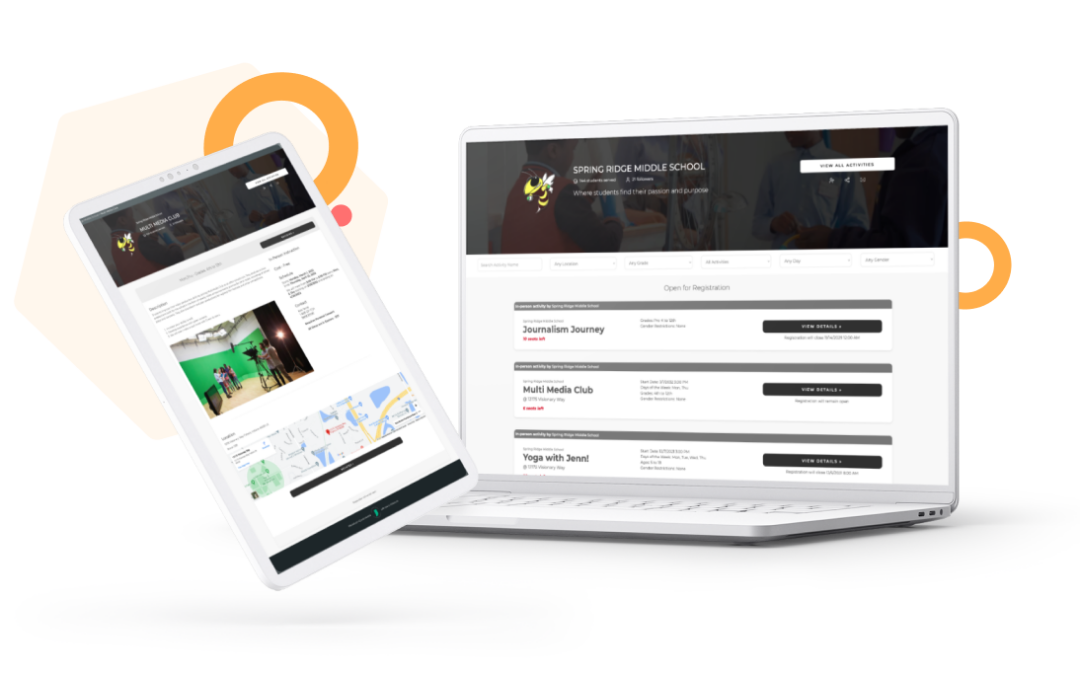
Your team manages registration, daily attendance, parent communication, grant compliance, and multi-site coordination — often with a small staff. The right after-school program software gives you the clean data, the professional reports, and the breathing room to focus on the kids.
What’s in this guide
- What after-school program software actually is
- Who benefits most from it
- The seven must-have features
- How to evaluate and compare platforms
- Questions to ask every vendor
- California-specific requirements
- Implementation: what to expect
- Pricing: what you’ll pay
- Frequently asked questions
What After-School Program Software Actually Is
After-school program software is a purpose-built platform that centralizes the core operations of a youth program, attendance tracking, online registration, family communication, billing, and grant compliance reporting, into a single system that every staff member can access and trust. It replaces the combination of spreadsheets, paper sign-in sheets, and disconnected apps that most organizations rely on when they’re getting started.
General-purpose tools like Google Sheets, generic database apps, or even mainstream childcare software can be adapted for after-school programs, but they were designed for different use cases. They rarely handle all the functions well, and they almost never produce the compliance-ready documentation funders require.
A platform designed specifically for out-of-school time (OST) programs understands that attendance looks different from a classroom, that registration happens in waves across a program year, that parents communicate on the go, and that your reporting requirements tie directly to the grants that keep your doors open.
Which after-school program software is best? It depends on your organization’s stage and your biggest operational challenge. A program whose main gap is grant compliance needs a different platform than one struggling with multi-site coordination. Use the evaluation framework in Section 4 to identify your priorities before requesting demos.
Who Benefits Most From Dedicated Software
Dedicated after-school program software moves from nice-to-have to essential once your team hits specific operational limits. Some signs your program is ready:
- Your team spends significant time each week manually compiling attendance data or chasing down missing sign-in sheets
- Grant reporting takes days of preparation because you’re piecing together information from multiple sources
- Staff turnover means starting over with data every time someone leaves
- You operate more than one site and can’t get a consistent picture of enrollment and attendance across locations
- Your district or funding agency has asked for data you don’t currently have in a clean, exportable format
- Parents regularly call to ask about their child’s attendance or enrollment status because there’s no self-service option for them
A national survey of more than 10,000 youth-serving professionals found that 47% report feeling burned out, even though most say they feel valued at work. Administrative overload is consistently cited as a driver of that exhaustion. Software built for this work removes the administrative grind that pushes good people out of the field.
Key workforce and compliance stats
- 47% of youth-serving professionals report feeling burned out (Wallace Foundation / American Institutes for Research, Power of Us Workforce Survey)
- 3 years — the minimum federal grant record retention period under 2 CFR 200.334
- 55% UPP — the ELO-P Rate 1 eligibility threshold, lowered from 75% starting with the 2025-26 school year
The Seven Must-Have Features in After-School Program Software
These seven capabilities matter most when evaluating after-school management software:
- Digital attendance tracking: real-time check-in via QR code, staff/volunteer kiosk, and manual roster entry, with timestamps attached to every record
- Online registration: parent-facing enrollment forms with waitlist management, capacity limits, emergency contacts, and authorized pickup collection in one flow
- Parent communication tools: built-in messaging and notifications tied to attendance events, plus a parent portal for self-service access to schedules, attendance history, and payments
- Funder-ready reporting: one-click generation of attendance summaries, unduplicated participant counts, demographic breakdowns, and outcome data for grant reports
- SIS integration: two-way data sync with your district’s student information system (PowerSchool, Aeries, Infinite Campus) so enrollment data flows in and attendance flows back out automatically
- Multi-site support: a centralized dashboard that gives administrators a cross-site view while letting individual site coordinators manage their own programs and permissions
- Mobile access for on-site staff: a responsive interface or app that works on a tablet or phone in the gym, cafeteria, or field, and holds up even with unreliable WiFi
Features Commonly Overlooked During Demos
Demos show best-case workflows. Ask specifically about each of these before the pitch is over:
- Authorized pickup verification with digital signature: collecting authorized names at registration is not the same as verifying identity at release. The platform should capture the releasing adult’s identity and a digital signature at the moment of pickup, linked to that specific attendance record
- Printable roster failsafe: when the internet is down, or a device fails, staff need to fall back on paper. Ask whether rosters can be printed with relevant alerts (medical notes, custody restrictions) visible, and how the platform handles data captured offline
- Check-out timestamps for contact hour tracking: some systems capture arrival but not departure. If your funding tracks hours of participation rather than days present, departure time isn’t optional — it’s what produces documentable contact hours rather than estimates
- Data export in formats auditors accept: a report that looks accurate on screen but exports to a format your grant monitor can’t accept is a problem that won’t surface until reporting season. Test exports before you commit
- Year-over-year data retention: staff turnover is common in OST programs. When someone leaves, their institutional knowledge often goes with them. A platform that preserves full historical data across personnel changes is protecting something that’s genuinely hard to rebuild
Test before you commit
Before signing with any platform, run a one-week pilot. Enter real (or test) attendance, pull an export, and open the file. Verify that check-in time, check-out time, and student identification all appear in the columns you’d need for your most demanding grant report. This test takes under an hour and has saved many programs from a costly mistake.
How to Evaluate After-School Program Software: A Practical Framework
The after-school software category includes dozens of platforms, from well-known names like Procare Solutions, Brightwheel, and EZChildTrack to OST-specific tools like AfterSchool HQ. Start by identifying your biggest operational bottleneck, then weigh features against that need.
| If your biggest pain point is… | Prioritize this capability | Don’t settle for |
|---|---|---|
| Attendance is a daily bottleneck | Multiple check-in methods (QR, kiosk, manual) with real-time dashboards | Manual roster entry as the only option |
| Registration paperwork overwhelms your team | Parent-facing online forms, digital document collection, waitlist automation | Systems that move paper forms to PDFs without true digital workflow |
| Grant reports take days every cycle | One-click compliance reports, grantor-specific export templates, demographic breakdowns | Generic exports you then format manually in Excel |
| Data leaves with every staff departure | Cloud-based platform with role-based access and full historical data retention | Local software installations or admin-controlled export gating |
| Cross-site data is inconsistent | Centralized multi-site dashboard, standardized data entry workflows | Separate instances per site that have to be manually consolidated |
| District data requires constant re-entry | Confirmed two-way SIS integration with your specific district platform | CSV import/export positioned as “integration” |
Once you’ve identified your top two or three evaluation priorities, narrow your vendor list to platforms that have confirmed those capabilities. “On the roadmap” or “available with configuration” are not the same as working today. Ask for a reference from an organization of similar scale that uses that specific feature.
Three to five platforms is a workable short list. Beyond that, the comparisons start to blur.
Questions to Ask Every After-School Software Vendor
Use these questions to move past the demo and learn how the software performs on a real program day.
Does the system record both arrival and departure timestamps? Federal programs, including 21st CCLC, require participation reported in hours, not days. A system that captures only arrival creates estimated contact hours, and estimates create audit risk.
Can authorized-pickup lists be updated mid-year, and does each pickup require a digital signature? Custody situations, emergency contacts, and authorized adults change throughout the year. The platform needs to allow real-time updates and capture a digital signature at the moment of release, not just at initial registration.
Which SIS platforms do you have confirmed integrations with, and are they truly bidirectional? “Integration” can mean anything from a full nightly two-way sync to a manual CSV upload. Ask specifically whether student enrollment data flows in automatically, and whether attendance data syncs back to the district without staff intervention.
What export formats are available for grant reporting, and can I see a sample for a 21st CCLC or ASES report? Federal grant monitors under 2 CFR 200.334 require source documentation traceable to named individuals on documented dates. Asking for a sample export for your specific grant program will quickly show whether the platform fits your compliance needs.
What does implementation support look like, and who is our point of contact after go-live? Onboarding is where many platforms disappoint. A named support contact, a structured implementation timeline, and live training for your staff are worth more than a long feature list backed by documentation-only support.
If we need to leave, how do we get our data out? Your attendance history, enrollment records, and family data belong to your organization. Confirm that full exports are available at any time, in formats you can open without needing the platform to read them. Hesitation on this question is worth noting.
California-Specific Requirements for After-School Program Software
California programs only. This section covers ASES, ELO-P, and California Attendance Recovery programs. If your organization operates outside California, skip to Section 7.
California after-school programs operate under some of the most detailed compliance documentation requirements in the country. ASES, ELO-P, and California Attendance Recovery each carry specific data requirements, and the California Department of Education conducts annual reviews with funding consequences tied to documentation gaps.
ASES (After-School Education and Safety)
ASES-funded programs must maintain timestamped attendance records tied to specific activities, with minimum attendance thresholds documented for each enrolled student. If a program’s actual attendance falls below 75% of its target attendance level, CDE performs a review and can adjust the grant; a shortfall of more than 15 percentage points below target in each of two consecutive years also triggers a grant-level adjustment. Your software needs to surface individual student attendance patterns, not just aggregate headcounts.
ELO-P (Expanded Learning Opportunities Program)
ELO-P documentation requirements center on three data points: daily attendance logs with unduplicated student counts, evidence that programs are meeting the required 9-hour school day threshold (combining instructional time, recess, meals, and expanded learning), and demographic participation data for continuous quality improvement (CQI) reporting.
Annual CDE audits can trigger proportional funding returns for failing to document access for eligible students, or per-day penalties when documented hours fall short of thresholds. The data your software produces has direct financial consequences.
One important note: beginning with the 2025-26 school year, the UPP (Unduplicated Pupil Percentage) threshold determining Rate 1 eligibility for ELO-P was reduced from 75% to 55%. Programs previously rated Rate 2 or not eligible should verify their current qualification status with their LEA’s expanded learning coordinator.
California Attendance Recovery
Attendance Recovery programs require documentation that distinguishes between enrolled students who attend regularly and those in formal attendance recovery protocols. Your platform needs activity-level attribution, the ability to connect a student’s participation to the specific program component it’s documented under, so attendance recovery time is tracked separately from general expanded learning time.
CALPADS and SIS Requirements
Programs with district partnerships face the additional layer of CALPADS (California Longitudinal Pupil Achievement Data System) reporting, which draws from district SIS data. A platform with confirmed two-way integration with Aeries or PowerSchool significantly reduces the data gap between your program records and the district’s CALPADS submissions.
California Compliance Software Checklist
Implementing After-School Program Software: What to Expect
Switching software mid-year is disruptive. Timing and data migration planning matter more than platform choice; most implementation problems trace back to those two things, not the software itself.
- Data audit: before migrating anything, audit what you currently have. Locate your existing roster data, attendance history, and family contact records. Identify what needs to move and what can remain archived. A clean data migration prevents the most common post-implementation headaches
- Configuration and setup: work with your implementation contact to configure the platform for your specific programs, sites, and attendance workflows. This is also when you establish SIS integration and test it against a sample of student records
- Staff training: front-line staff using a kiosk or mobile check-in need hands-on practice before go-live. Coordinators and program directors need deeper training on reporting and data pulls
- Pilot period: run the new system in parallel with your existing process for at least one to two weeks before going fully live. Pull a test report, verify it matches expectations, and surface any gaps before they affect real program data
- Full go-live and 30-day support period: multi-site deployments generally take longer than single-site rollouts, since each location has to be brought online and verified in turn. Designate an internal champion at each site to own troubleshooting for the first 30 days
“They took the data that we had in our previous system and transferred it into AfterSchool HQ. They walked us through that process and made sure that the integrity of the data was good. It is fabulous working with AfterSchool HQ!”
— Charlene, Operation Xcel
When to Make the Switch
The best time to switch after-school program software is between school years, ideally in the six to eight weeks before the new program year begins. This gives you time to migrate historical data without disrupting active enrollment or attendance records. If a mid-year switch is unavoidable, the best secondary window is after the end of a semester, before a new enrollment cycle opens.
Data portability rule
Before signing any contract, confirm in writing that you have the right to export your full data set at any time, rosters, attendance history, and family records, in a format you can open without needing the platform’s software to read it. This is standard practice among reputable vendors. Hesitation on this question is meaningful.
After-School Program Software Pricing: What to Expect
After-school program software pricing hasn’t standardized around a single model. The subscription number on the sales page rarely reflects full cost; understanding each structure helps you budget accurately.
Common Pricing Models
A flat annual fee is the most predictable structure. You pay a single price per year, regardless of enrollment size. It works well for organizations that want budget predictability and don’t want per-student pricing to scale unexpectedly as enrollment grows.
Per-student pricing ties cost to enrollment volume. This can be economical at small enrollment levels but more expensive at scale, and it creates a subtle disincentive for the enrollment growth most programs are working to achieve. Not every vendor offers this model, and rates vary widely by platform and feature set.
Per-site or per-module pricing is common in enterprise-focused platforms. Lower entry costs can become significantly higher total spend once you’ve added all the features you actually need. Map out the full-feature cost before comparing to flat-fee alternatives.
Freemium models offer a no-cost tier with limited functionality, typically capped by student count, feature access, or storage. Genuinely useful for very small programs or for evaluating a platform before committing to a paid plan.
What to Budget for Beyond the Subscription
The subscription price is rarely the full cost of switching. Budget for these items when building your business case:
- Implementation and onboarding: some platforms include this in the subscription; others charge a one-time setup fee ranging from a few hundred to several thousand dollars depending on complexity and site count
- Staff training time: even when training is included in the contract, factor in the actual staff hours required. For a multi-site organization, this is substantial and should be part of the ROI calculation
- Hardware: kiosk-based check-in requires tablets and stands. QR code check-in via staff phones eliminates this cost in many setups
- Data migration assistance: programs with years of historical data in a legacy system may need paid migration services. Confirm what’s included in your contract before signing
Making the ROI Case Internally
When presenting this investment to a board or executive team, frame it against two measurable outcomes: staff time recovered and funding risk reduced.
If your team spends ten hours per month compiling attendance reports manually, the annual cost of that staff time likely exceeds the software subscription. Factor in one audit finding or a missed reporting deadline, and the case is clear.
AfterSchool HQ: Built for After-School, Not Adapted from It
AfterSchool HQ is an attendance tracking, registration, and reporting platform built by youth program providers, for youth program providers. It serves after-school organizations, school districts, nonprofits, and multi-site providers, with California-specific compliance support for ASES, ELO-P, and Attendance Recovery programs, and dedicated support for 21st CCLC grantees nationally.
If you’re specifically evaluating the registration piece of your tech stack, see our deep dive on after-school registration software features. If you’re weighing your broader tool stack, including classroom engagement apps alongside admin software, see our guide to the best tools for schools and after-school programs.
Frequently Asked Questions About After-School Program Software
Choosing the Platform That Fits Where You Are Now
There’s no single “best” after-school program software, only the one that matches your actual bottleneck, your compliance requirements, and your budget. Work through the evaluation framework, ask the vendor questions that push past the demo, and run the one-week pilot before you sign anything.
AfterSchool HQ
Ready to see how AfterSchool HQ stacks up against your checklist?
Bring your evaluation framework. We’ll walk through exactly how the platform handles your biggest bottleneck.